 Products
This is a plugin for accelerating Joomla and increasing the Google Page Speed score.
Free trial
Why Speed?
Who Can use?
Technical Details
How to Test?
Speedero
This plugin is known as Speedero. If you are looking to optimize your site Joomla or WordPress, this plugin can truly improve it. This can be confirmed using Google Page Speed Insights. Accelerating a Joomla or WordPress website is very important. Sometimes things get very slow and people lose their visitors. Please take a close look at the test instructions.
Speed is Important
After great success for our SpeedBooster for Virtuemart, we are glad to announce our new Speed Plugin. This plugin allows to speed up any website Joomla or WordPress. Our plugin is prepared for the main extensions and plugins for Joomla and WordPress, including Virtuemart, JomSocial, WooCommerce and many others.
This plugin emphasizes CSS and javascript files to accelerate your web site. Our state-of-the-art caching, combination, placement and compression of CSS and javascript on your website can do things really well. This is not only helpful to first time visitors, but also to returning visitors.
Check it out on YOUR website before you buy.
Contact us now to get a free, fully working copy to try it live.
The Need for More Speed!
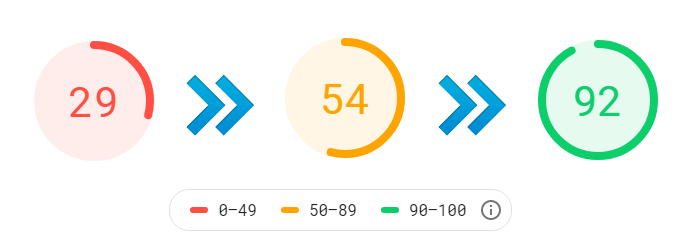
Listen to what the giants say.
According to surveys done by Akamai and Gomez, nearly half of web users expect a site to load in 2 seconds or less, and they tend to abandon a site that isn’t loaded within 3 seconds.
79% of web shoppers who have trouble with web site performance say they won’t return to the site to buy again and around 44% of them would tell a friend if they had a poor experience shopping online.
(Source: kissmetrics blog)
A lot more to say about speed and about our new speed plugin but the best thing is to see it, test it and enjoy it by yourself.
Great for Joomla and WordPress
Not only blogs, but e-commerce sites need to be faster. Sometimes speed is one of the greatest concerns for ecommerce sites. Faster loading results in higher conversions. Attractive websites attract visitors, but loading them slowly ruins the entire experience.
Limited time Discount!
How to test for Joomla?
1) Install the plugin
2) Enable it. You will see a license dialogue in
Joomla backend >> Plugin Manager

3) Click on 'Get Trial License' link. Download license file and upload using the file upload button.
4) The plugin has several backend parameters. Edit it to see them;
Joomla backend >> Plugin Manager

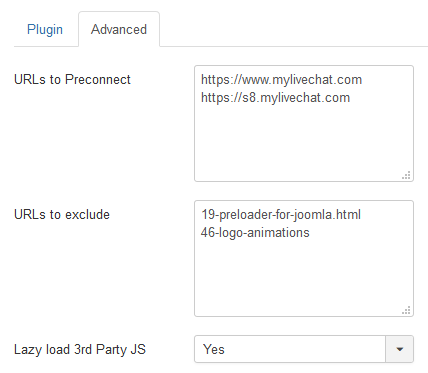
Several settings are available on the back-end. Some default settings are defined. If your webserver is old and slow, you may need to do a bit of optimization to get the best speed score. Moreover, most professional hosting servers work easily with any optimizations. If you change the background parameters, test them using Google Page PageSpeed Insights.
If you see a conflict between your template, any third party add-ons or any other plugin, please let us know.
5) Here is the link to help you with Google Page Speed Insights.
https://developers.google.com/speed/pagespeed/insights/
Just ask us, we will be happy to assist you in the evaluation.
In the Eyes of Google!
More speed increases your visitor experience and can also have a positive impact on your site in Google Search. Here is some background information about accelerating Joomla or WordPress.
Server Side Optimization for Joomla
Joomla has a built-in cache plugin, which caches the whole joomla page. When this plugin is enabled, first time it caches and next time(s) it just deliver from cache. It does not go to each Joomla component for getting the output. So not K2 and Virtuemart, nor JomSocial. Definitely it is the fastest joomla page creation on server.
It works very well for completely static Joomla websites. But if you have something dynamic on your page, cache plugin more often than not gives the wrong output. That is because it does not process anything at all. So, if the native cache plugin is enabled and your site is totally static, you may set a cache time in global configuration something like 21600 for 15 days and get a fast output of Joomla page's html. In that case, you need nothing for server-side optimization. This is because the Joomla page was created on the server once and remains the same for the next fortnight.
As this is not the case with most websites, you need to disable cache plugin. Joomla websites are much more than just static HTML pages. If cache plugin is disabled, there is a need of our K2 listings Speed up or Virtuemart Speed up plugins. Our plugins, caches only the component content (K2 or Virtuemart) and not the whole Joomla page. So, other parts of the your Joomla site may contain dynamic content.
So the bottom line is;
1) System Cache plugin disabled - Slow - Everything processed every time. Also the K2 and Virtuemart content.
2) The system Cache plugin is disabled, but our K2 Speed Booster and/or Virtuemart Speed Booster plugin is enabled. Best in most cases. Our Speed plugins deliver from cache, but Joomla remains dynamic. Means, speed without any compromise.
3) Speeding up loading of Joomla Modules with our SpeedPlus Plugin. This plugin is good for all sites and not for any specific Joomla extension.
4) Not recommended and not usable for most websites when System Cache plugin enabled - No processing at all. Page delivered from cache but static.
5) For some dynamic extensions like JomSocial, the server side optimization mostly does not work. In that case you have the choice of optimization on client side when your browser delivers the HTML to the visitor.
Client Side Optimization of Joomla
Your Joomla site is not only a bunch of html tags. It links to various other resources as well. Like CSS files, Javascript files, Images and many more.
Whatever method is used for server-side optimization, client-side optimization is also important. It is in fact organize your html code effectively as the client browser can download as quickly as possible. Various tools are available to test the speed of your Joomla site to optimize the client side. As we are all aware, Google's PageSpeed Insights is awesome.
The plugin named Speedero, the one you are looking at now, can automatically arrange and optimize the HTML produced by your Joomla site. It does many things including Javascript and CSS optimization, Image lazy loading and many more.

Eliminate render-blocking resources
Google Page Speed Insights often prompts you to remove resources that block rendering. Why is it important to delete resources that block rendering from your page? And the way to do this is really important to understand. Normally, every webpage has multiple style sheets and related javascript files. If they are linked in a way, which restricts browsers to render the page in front of the client unless all resources are fully loaded, lefts a bad impression of slow performance to your visitors. You need to avoid it.
Our speed plugin automatically takes care of it by moving, merging and delayed loading of your critical page resources, CSS files and JavaScript files. Hence, you get a good Google page speed score and better performance out of the box.
Which Speed Plugin is best for me?
Here is some information about the difference in our various speed plugins for Joomla:
1) The SpeedBooster for Virtuemart is good if the Virtuemart component is slowing down your website. This works great for Virtuemart Category pages and Product detail pages.
https://codingmall.com/products-mainmenu-8/65-speed-up-virtuemart
You can test it tools.pingdom.com. You need to see the main request loading time in the waterfall chart.
2) The SpeedPlus is good if you Joomla modules are loading slow. This is good for any Joomla module including modules for Virtuemart, JomSocial, K2 etc.
https://codingmall.com/products-mainmenu-8/87-faster-joomla-a-virtuemart
You can check it by loading your website without modules by using this url;
www.example.com/?tmpl=component
If it is loading fast then you need The SpeedPlus.
3) The Speedero is good if the overall experience of website delivery to the client is slow. You can test it with Google PageSpeed;
https://developers.google.com/speed/pagespeed/insights/
If you have a low score there, then you need this plugin.
Note: You may need more than one plugin if more than one of the above things are slow.
Custom Services and Beyond Joomla
If you want to speed up even more after using our Speedero or your site is not Joomla, we also provide custom services to increase the speed and score of your website. You will obtain one-on-one support. Google likes faster websites, which means better ranking possible in search results. Always watch how your site is performing.
This can be done for any site. Any CMS, any framework. It can be anything. Joomla, WordPress, Drupal or any other CMS. The Web Speed Up rules remain the same. Apart from scripts, server configuration also plays an important role in server-side optimisation. Your CSS files, Javascript files, compression, caching, SEO plugins and many other things can be the cause of slow and low speed score. Feel free to take action now.
Premium Offer with a Guarantee
For those looking for premium services, we offer a customized package of 259 pounds with a guarantee to get a Google Page Speed Score of 90 or more. If the score isn't achieved, your money will be refunded. Guaranteed. 100 percent risk-free. This package contains as many speed plugins required on your website and any custom coding if necessary to reach the grade of 90+. We welcome Joomla, WordPress, Drupal, Magento, PrestaShop, Laravel, Symfony. Any website, any technology, can be accelerated. Do not hesitate to contact us for more information.
Is CloudFlare Slow?
Is Cloudflare slowing down your Joomla site? Are you on the free plan of Cloudflare. People occasionally complain that Cloudflare does slow down websites by giving a high TTFB (Time to First Byte). There is a also cache miss issue. Like many other CDNs, you need to fill the Cloudflare CDN cache first before you get a performance increase. This is annoying for first time visitors. When they visit your Joomla or WordPress website first, most probably they connect to an Edge server which does not have it's cache filled with your static files. The result is that they get a slow response because first the Edge server needs to get those files from the origin server.
The next problem, is filling the cache is sometimes very slow. Even on the second or third visit you see a cf-cache-status MISS header. This happens because of slow filling of cache on Edge server at the pop.
Speeding Up your CDN
We also provide custom services to speed up your CDN. Whether it is Cloudflare, KeyCDN, StackPath, Fastly or any other CDN, we can give it a performance boost and a high cache hit rate. Contact us for a free analysis of your WordPress or Joomla website. If you have a high traffic on your website, we can even build up a custom CDN for you. This gives you flexibility is speeding your target regions across the globe.
Free Consultation
Sometimes things contradict one another in your Joomla template or WordPress theme. It makes your website load slowly. We offer a free consultation to find the problem and suggest the best way to make your web site load faster. Feel free to Contact Us. We will be happy to assist.